Integration
Your ads and your CRM, finally connected
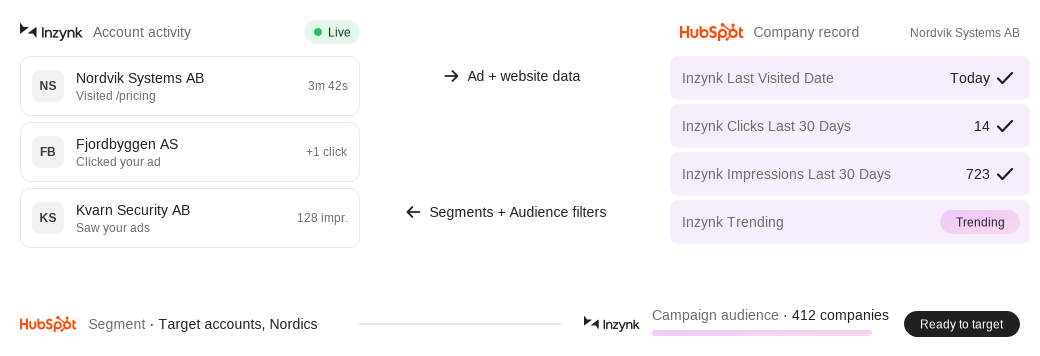
See which target accounts saw your ads and visited your site, right on the HubSpot company record. Then turn your HubSpot segments into Inzynk audiences, without a single CSV export.
IN GOOD COMPANY
Trusted by teams worldwide














THE PROBLEM
Your ad results and your pipeline live in different worlds
01 · PAIN
Proving impact means spreadsheets
Exporting ad numbers and matching them to CRM records by hand, every month, before every board meeting.
02 · PAIN
Sales can’t see who’s warming up
The accounts that saw your ads and came back to your pricing page look exactly like every other record in HubSpot.
03 · PAIN
Target lists get rebuilt in every tool
Your best segments already exist in HubSpot. Recreating them for advertising wastes time and drifts out of date.
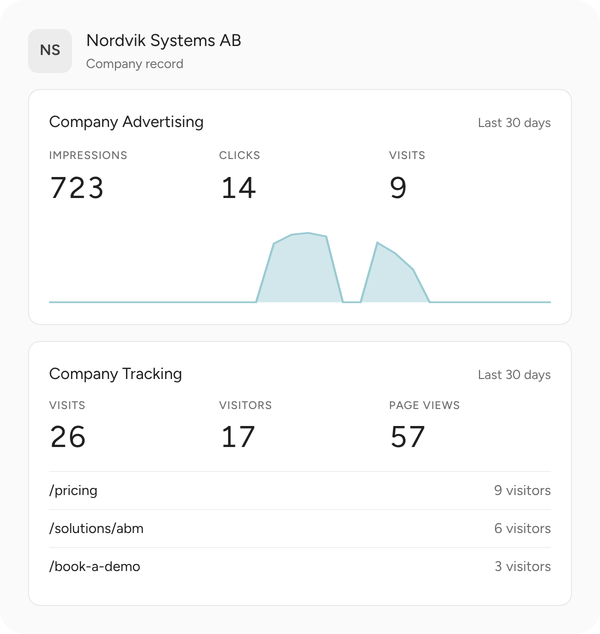
See every account’s engagement on the company card
Two Inzynk cards sit on every matched company record. Sales sees who is engaging before they pick up the phone, and you build the report your management asks for without leaving the CRM.
- Company Advertising card. Impressions, clicks and visits from your ads, over any date range.
- Company Tracking card. Visits, visitors, page views and the exact pages each account read.
- 11 company properties. Use Inzynk data in HubSpot lists, workflows and reports. Synced every hour.

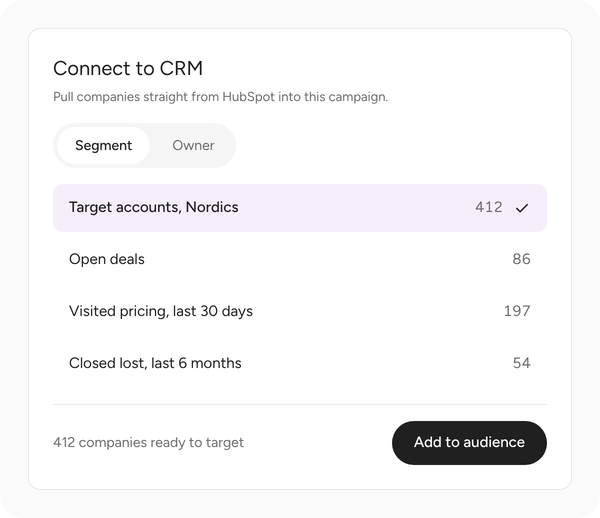
Turn your HubSpot segments into ad audiences
The accounts you care about are already in HubSpot. Pick a segment, lifecycle stage or every company owned by a sales rep, and Inzynk loads those companies straight into your campaign.

One view of every account, for marketing and sales
For marketing
Prove what your advertising did, account by account
- Report on reached and engaged accounts inside HubSpot, next to pipeline - Build smart lists such as “visited in the last 30 days” or “trending companies” - Measure the time from first ad impression to closed deal - Trigger workflows when a target account starts engaging
For sales
Call the accounts that are already paying attention
- Check the Company Tracking card before every outreach call - Open with the pages they actually read, not a guess - Prioritise by last visit date and rising visit trends - Time calls to when an account is seeing your ads
Customer voices
““We saw the opportunity to be top of mind for our most important customers. It also lets us show a different side of ourselves and highlight the perspective that is most important for that particular customer””
“I really like the way Inzynk includes the sales team throughout the campaigns and helps sales and marketing getting more aligned.”
“Inzynk helps us with the right questions to think about our customer's pains and gains, this helps us to increase visibility and to drive the complex B2B sales process effectively forward.”
Get started
Connected in a few minutes
01
Open Integrations
In Inzynk, go to Settings › Seat Preferences › Integrations and choose Connect HubSpot Integration. Or download the app in Hubspot marketplace.
02
Approve access
Pick your HubSpot account and approve the permissions. Secure OAuth, no passwords shared.
03
Let it sync
Inzynk matches your companies to HubSpot on domain and country, then keeps them updated every hour.
Frequently asked questions
More detail in the integration documentation.
Every hour, automatically. You can also run a manual sync from the app’s settings page in HubSpot at any time.
On domain and country. Anything that doesn’t match automatically can be matched by hand from the Inzynk home page inside HubSpot.
Only if you switch on “Create visitor companies”. Leave it off and Inzynk only updates companies you already have.
No. The integration works at company level only. The only personal data it reads is your HubSpot owners’ names, used for the owner filter and never stored.
Inzynk reads the segment when you select it. To pick up new members, select the segment again in your campaign.
Stop defending ad spend. Start showing real impact.
Launch your first capmaign in minutes.